
Kennel Link™ was designed for the non-computer user. You are prompted step-by-step through each process. Minimal training is required and handling staff turnover is easier than ever.
Our software is tailored around your facility. As your business changes so will your software. Your Kennel Link customer and pet database can also be used by multiple locations.
Since Kennel Link™ is web-based, you don't have any expensive initial investment. All that is required to get started is a modest set-up fee and your first month's service fee.
Automatically send reminders ahead of any reservation and thank you notes afterward. Receive confirmations and change requests. Have direct conversations with customers. Automate curbside and parking lot queues.
Automate your curbside & parking lot check-in and out lines. Integrates with texting. See who's waiting, where they are, and why they're here. Quickly assess what needs to happen next and automatically assign staff & status.
Kennel Link gives you instant access to your records from anywhere you have an internet connection. Quickly review daily service schedules and reports. Instantly check reservations and availability.
Kennel Link allows your customers to create an account and make boarding reservations from your website. With our card processor, you can also accept deposits and payments of outstanding balances.
Your customers can view and pay their bill using our customer-facing kiosk when you use our card processor. When a credit card is used for payment, they can sign directly on the kiosk using their finger and their signature is stored in your database. You can modify many optional settings such as displaying a tip prompt, offering your customer the option to print or email their receipt, and much more.
With a DropBox account and our optional DropBox module, you can store customer contracts, vaccination records and other important documents electronically. You can access these files through Kennel Link with the click of a button.
Installation of software can be a daunting task. How many times have you installed new software on your computer and found that after you've finished the installation everything on your computer looks and works differently? With Kennel Link™, there is no software to install and none of your computer settings will be modified. Just access our system over the internet. It's that easy.
Kennel Link™ is run on our secure server so your computer doesn't need to perform any complex tasks. If you can access the internet you can use Kennel Link™. You can use your PC or Mac. All up-to-date Microsoft Edge, Mozilla Firefox, and Google Chrome browsers are supported.
We upgrade our software continually throughout the year. Stop waiting for the annual upgrade just for bug fixes or the latest features. All of our customers' software is always up-to-date.
Kennel Link™ provides a complete credit card processing solution that integrates with your Kennel Link™ site. You can process all major credit and debit cards quickly and securely. No more fumbling with a separate card terminal and each transaction takes approximately 5 seconds! With our Public Access module, your customers can also make online payments for deposits or previous stays.
Using Kennel Link's™ integrated card processor enables you to issue and redeem gift cards quickly and easily. Gift cards are a well known way to increase your earnings not only from unredeemed cards but from additional purchases at the time of redemption.
Sending reminders, receipts, and ad-hoc messages via email is quick and easy with our integrated ability to send email. Generate email lists based upon a specific criteria like all boarding customers, customers that were groomed last week or customers that have upcoming daycare reservations.
Selling products is a snap when using a barcode scanner with Kennel Link™. Don't waste precious time selecting products from a list. Just scan your products with a barcode scanner.
Have you ever had three dogs named Brandy or four black labs at your
facility at the same time? With PetDetect and Kennel Link™, you can
print pet collars to help you identify who is who! You can also print
labels for their personal property so nothing gets lost.
Learn More
Kennel Link™ works with cash drawers attached to a USB port when you use Windows and Internet Explorer.
Kennel management software is a business expense that is tax deductible. Consult your tax advisor or accountant for more information.
With our integrated credit card processing, barcode scanning and cash drawer features, Kennel Link provides a complete point-of-sale solution.
-
Credit Card
ProcessingCredit Card Processing with Kennel Link

We offer a complete credit card processing solution that integrates with your Kennel Link site. You can process all major credit and debit cards quickly and securely. Each transaction takes approximately 5 seconds! With our Public Access module, your customers can also make a deposit for a future boarding stay or pay outstanding balances.
More
benefitsSave TimeProcess a transaction in seconds. Easily adjust, void, or refund payments right from Kennel Link.
Store Customer Card NumbersSecurely store your customers' cards on file.
Capture SignaturesWith our optional customer-facing kiosk, you can store a digital image of your customer's signature in your Kennel Link database.
Customers Can Pay OnlineWith our optional Public Access module, you can accept deposits for future reservations and your customers can pay outstanding balances.
SecurityCards are encrypted from the moment they're swiped or keyed, leaving no worries about a data breach - even while saving credit cards on file.
AutomationApproved transactions are automatically recorded in Kennel Link and there is no need to process the payment on a separate machine, thereby reducing errors.
Customer Facing KioskOur customer-facing kiosk is a touch-screen tablet that displays the bill and allows for tipping, tender type, signature capture, and receipt choice.
Gift Card ProcessingYou can issue and redeem gift cards quickly and easily. Increase your earnings not only from unredeemed cards but from additional purchases at the time of redemption.
How does
it work:You can process all major credit and debit cards quickly and securely right from your customer’s bill. Swipe cards or keep your customers’ credit card numbers on file. With our optional kiosk, you can even capture signatures electronically and avoid having to print signature slips. This reduces processing time while increasing convenience so your workflow is more efficient.
What is
needed?Because you access your Kennel Link account from the cloud, any modest computer or tablet will work. You can use your PC or Mac and Internet Explorer, Firefox or Chrome.
 EMV/Chip/Tap
Ingenico iPP320 Kiosk &
Ingenico iPP320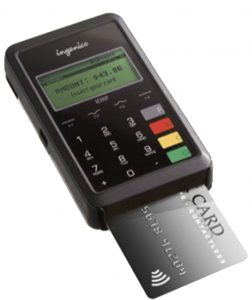 Ingenico iCMP
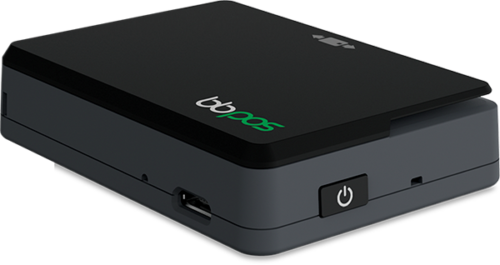 Walker BT
Wired or Wireless USB  WiFi
WiFi
 Bluetooth
Bluetooth
Bluetooth
PC, MAC phone/tablet 
Save Cards 
PIN Debit
No Chip
Manually Key
Signature Capture No
No
Tipping On paper slip (Not for PIN Debit) On
kiosk
On paper slip (Not for PIN Debit) On
phone/tablet
Browsers 
Optional Receipt Printer
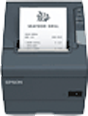 Epson TM-T88V Receipt
Printer
Epson TM-T88V Receipt
Printer
- Recommended for gathering signatures and tips if you don’t purchase the kiosk.
- Recommended if you don’t use a kiosk and don’t want your staff to ask for the tip amount.
- Recommended with any hardware option if you wish to print a payment receipt instead of the whole bill.
- Epson product and support/driver pages.
Set-up process- Contact OpenEdge at (800) 774-6462 Option #2 or startnow@openedgepay.com to begin the application process.
- OpenEdge will assist you through the application process and get your hardware working.
- Kennel Link will assist you with the Kiosk.
Tech Support
OpenEdge Technical Support can be reached at (800) 774-6462 Option 2.
-
Customer-Facing Kiosk
Customer-facing Kiosk with Kennel Link

With our integrated credit card processing, allow your customers to view and pay their bill using our customer-facing kiosk. When a card is used for payment, they can sign directly on the kiosk using their finger and their signature is stored in your database. The kiosk is a Windows-based tablet and can be mounted on your counter for your customer’s viewing. With our kiosk configuration page, you can modify many optional settings such as displaying a tip prompt, displaying your logo, offering your customer the option to print or email their receipt, and much more.
How does
it work?Kennel Link offers a customer-facing kiosk to our United States customers that significantly improves your customer’s experience at the register and increases tips to your staff. The kiosk is an 8-inch tablet that is custom-configured for your site and positioned on your check-out counter. It is controlled by your staff using your Kennel Link site.
The kiosk adds the following features:
- Displays the bill
- Allows the customer to add a tip using percentages or adjustable amounts
- Prompts for the payment method
- Attaches to your card equipment (sold separately) to process credit, debit, and gift cards
- The customer signs for credit card payments with their finger (or optional stylus)
- Signature is stored in Kennel Link, eliminating the need for a receipt printer or archiving paper slips
- Can ask customer whether to print, email or provide no receipt
You must use our integrated card processor in order to use the kiosk. The kiosk uses Wi-Fi to communicate so all it needs is a power outlet and your card reading equipment. Add multiple kiosks as your business grows.
Controlled from Kennel LinkKennel Link allows you to command the kiosk from your computer. You can use multiple kiosks at your location.
Configurable- Upload your own logo or image to be displayed while it’s idle
- Choose whether to
- include the check tender type
- include the gift card tender type (from card processing configuration page)
- confirm the payment amount
- process cards on the kiosk or your staff’s computer
- prompt for signature on credit card payments
- prompt to print or email the invoice/receipt
- Customize the text to
- prompt for tip
- prompt for a copy of the receipt
- prompt to confirm the amount
- prompt for signature
- see a staff member message
- done/thank you message
System Requirements- You must use our integrated card processor
- Requires card reading equipment (sold separately)
- The kiosk requires a Wi-Fi or Ethernet connection to the Internet
- A standard power outlet nearby
What does
it cost?The kiosk is priced at $349, including shipping, purchased through and configured by Kennel Link.
Set-up process- Order your kiosk from Kennel Link
- Follow the included configuration instructions
-
Barcode Scanning Capability
Barcode Scanning Integration with Kennel Link
Selling products is simple when using a barcode scanner with Kennel Link. Just scan your products with a USB barcode scanner. A wireless option is also available.
How does
it work? A barcode
scanner may be used when selling products to your customers.
Just scan the product’s barcode when selling products.
A barcode
scanner may be used when selling products to your customers.
Just scan the product’s barcode when selling products.
What does
it cost?Your barcode scanner can be purchased through Kennel Link for $75 which includes configuration and shipping within the United States. We will ship to our international customers for an additional shipping fee.
-
Cash
DrawerCash Drawer Integration

Kennel Link has been integrated with certain cash drawers when connected to your Windows PC. These drawers include Logic Controls (bematech) CR-3003 (USB) or CR-1003 (USB) and any drawer with a serial COM port connection.
How does
it work?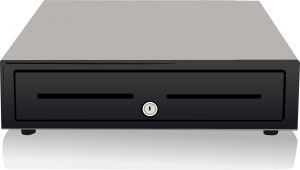 A cash drawer
driver is downloaded and installed onto your computer. This
allows Kennel Link to trigger the drawer whenever a
transaction is processed from the customer’s bill.
A cash drawer
driver is downloaded and installed onto your computer. This
allows Kennel Link to trigger the drawer whenever a
transaction is processed from the customer’s bill.
Set-up processInstall the drawer and drivers from the manufacturer, noting the COM port number.
Test the drawer using the manufacturer’s software.
Install and configure the Kennel Link Cash Drawer Driver using your account’s configuration page.
Now, when you save a transaction on a customer’s bill, the cash drawer will be opened.